Migrate the operating system to an SSD
What this gets you
A node’s operating system moved from its memory card onto a faster, more reliable NVMe SSD, with the rest of that SSD turned into a cluster storage pool in the same guided flow.
Before you start
- A Raspberry Pi 5 node with an NVMe SSD attached via the M.2 HAT+.
- The node’s operating system still on its microSD card (this flow is for moving it, not for a node already on NVMe).
- The SSD has nothing on it you need. Migrating erases it.
The steps
-
Open Storage → Migrate OS to SSD (or the launcher in the node’s Maintenance screen, under its Raspberry Pi section). Buddy checks the node qualifies: the right hardware, an SSD big enough for both the OS and a pool, firmware that can boot from NVMe, and the OS still on the microSD. If something’s missing, it tells you exactly what — e.g. “update the firmware first” — and the action stays blocked until you fix it.
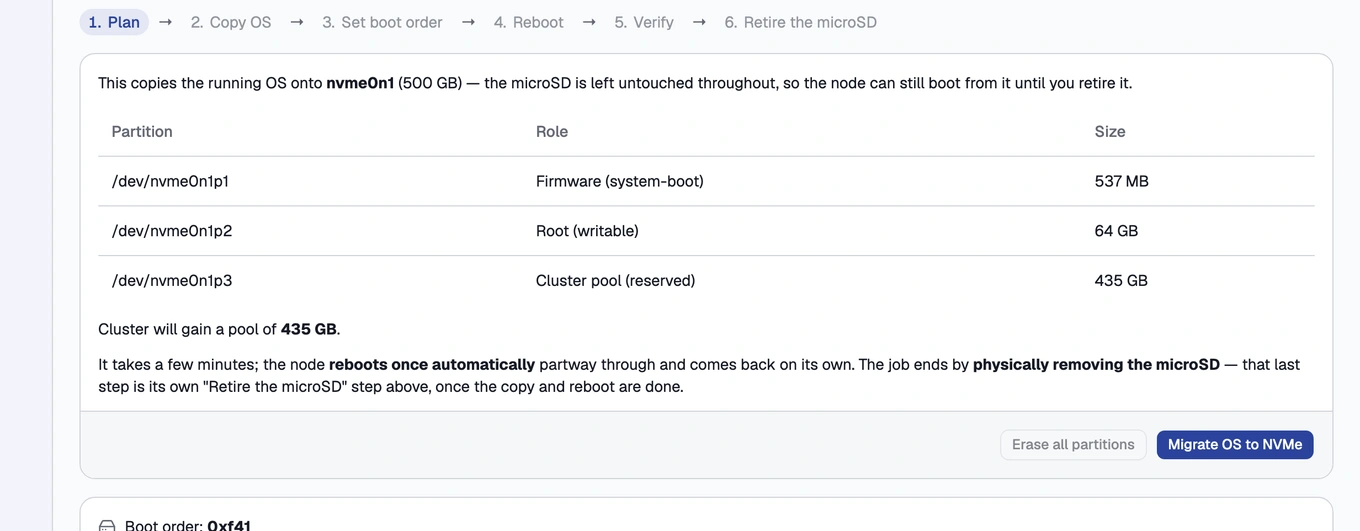
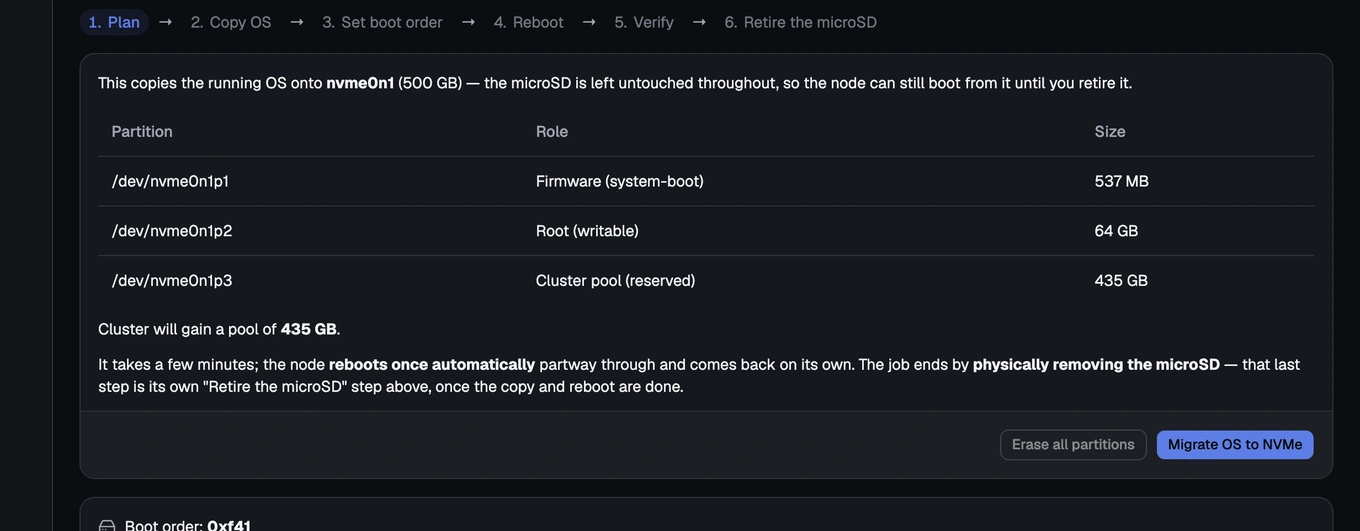
The migration wizard's eligibility check step -
Review the planned layout — firmware, a sized root partition, and a reserved partition for a future pool — and the pool capacity the cluster will gain. Confirm the data-loss warning.
Migrating erases the SSD. The microSD is left untouched throughout: it stays your fallback until you explicitly retire it in the last step.
-
Watch the live migration log. Buddy copies the OS to the SSD, points the node’s boot order at the NVMe disk (with the microSD kept as a fallback), and reboots. The node comes back booted from the NVMe, which the panel verifies.
-
Once verified, the reserved partition on the SSD appears as a preparable device. Turn it into a normal cluster pool exactly as in Prepare a disk and create a storage.
-
Power the node off, physically remove the microSD, power it back on, then choose “I removed the microSD — verify & finish.” Buddy re-checks that the node boots from the NVMe alone before finishing.
Until you complete this step, the microSD remains a complete rollback: if anything has gone wrong, the node still boots from it. If a migration fails, or you abort before this step, the node simply keeps booting from the microSD; nothing on the card is touched until you retire it.
How you know it worked
The node’s Maintenance screen shows it booted from the NVMe, and — once you’ve retired the microSD — the card is confirmed removed and the migration marked finished.
What can go wrong
- “Migrate OS to SSD” is missing or blocked
- The node didn’t come back booted from the NVMe
- Boot order didn’t change / it still boots from the microSD
- “Retire microSD” is refused
- I want to undo a migration
See these symptoms in Troubleshooting.